

 Manufacturing
Automating Document Processing in Moroccan Industrial Companies: Invoices, Orders, Contracts
Introduction
In a mid-sized Moroccan industrial company, between 60 and 80% of critical information flows through unstructured documents. PDFs arriving by email. Purchase order scans sent from a Derb Omar warehouse. Delivery notes photographed on a mobile phone at the port exit. Supplier invoices printed, signed, scanned, sent back by email, and manually re-entered into Sage or SAP by an accounting operator.
These documents come from everywhere: customers, suppliers, transporters, customs administrations. They arrive in different formats. They arrive on unpredictable schedules. They land in email inboxes where operators handle them one by one, manually, in order of arrival or according to urgency flagged by phone.
This is not a technology gap specific to Morocco. It is the operational standard in 2026 across virtually all industrial sectors in France, Spain, Canada, and throughout the French-speaking industrial market. The company has an ERP. The ERP cannot read documents. Nobody has solved the intake problem.
This article provides the complete framework: which flows to automate first, in what order, with what architecture, and how to avoid the three classic mistakes that turn a 6-week project into an 18-month one.
Biodéal: 2,943 orders processed automatically.
See the case studyThe Five Document Flows That Consume the Most Time
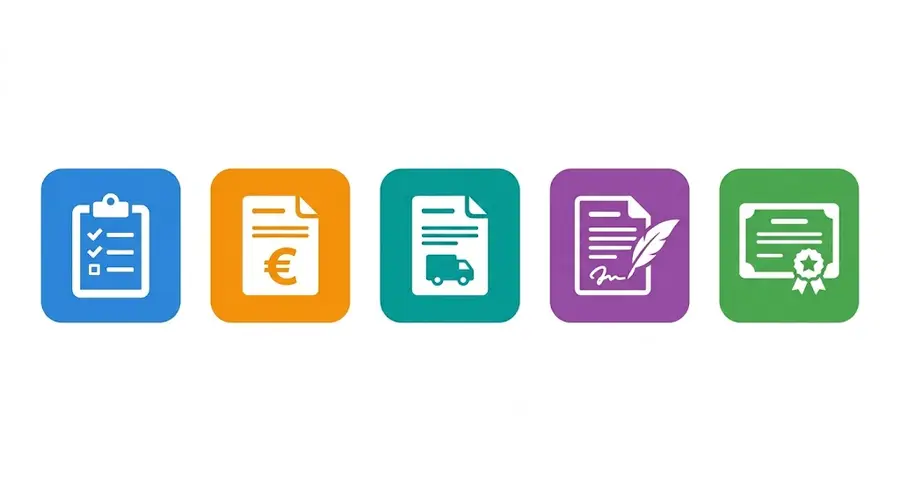
Not all industrial companies handle the same documents. But five flows appear consistently in document flow audits conducted in the Moroccan context, and these are systematically the same five flows that account for 80% of manual processing time.
Customer purchase orders are the highest-volume flow in distribution, food processing, and manufacturing. They arrive by email in three to five different formats depending on the customer: native PDF, Excel, free text in the message body, paper document scan, photo taken in a warehouse. The typical volume in a mid-sized company ranges from 200 to 800 purchase orders per month. Manual processing time per document: 8 to 15 minutes depending on complexity. For 400 monthly orders, this represents between 53 and 100 hours of pure transcription work.
Supplier invoices are the second flow by volume and the first by hidden financial impact. Manual processing: reading the invoice, matching it against the corresponding purchase order, verifying pricing conditions, validation by the purchasing manager, accounting entry. Typical volume: 100 to 400 invoices per month depending on activity. Manual processing time: 10 to 20 minutes per invoice. The major hidden cost is not processing time. It is the supplier payment delay created by the accumulation of invoices waiting to be processed. A strategic supplier paid late systematically becomes a less cooperative supplier when a supply emergency arises.
Transport documents are the flow most directly tied to customer invoicing. CMR notes, delivery notes, bills of lading for import-export flows. These documents confirm a delivery has taken place and trigger the right to invoice. When their processing takes 24 to 48 hours, customer invoicing is delayed by the same amount. On a portfolio of 200 monthly deliveries, a 2-day processing delay per document represents between 10 and 15 days of revenue delayed in invoicing each month. In the Moroccan context, this flow is amplified by customs documentation requirements on import-export flows through Tanger Med and the ports of Casablanca.
Contracts and amendments have lower volume but unit value that is incomparable to the other flows. A penalty clause missed in a construction or industrial maintenance contract can cost several times the annual cost of a document automation system. Manual processing of this flow involves re-reading each incoming contract, extracting key conditions, deadlines, penalties, price revision terms, delivery milestones, and entering them in a tracking system. In practice, this extraction is done partially, under time pressure, and the extracted information is never centralized in a structured way.
Regulatory and administrative documents form the fifth flow: conformity certificates, customs documents, import authorizations, certificates of origin. Manual processing consumes time on validity verification and routing to the right internal stakeholders. In the Moroccan context, this flow is particularly sensitive because of customs processing delays that penalize companies whose documents are not in order at port entry.
Why These Flows Remain Manual Despite the ERP
This is the question every IT director asks after investing in SAP, Sage, Odoo, or Microsoft Dynamics for ten years and finding that their teams still spend as much time on documents.
The answer is architectural. An ERP is a structured data processing system. It excels at this role: managing inventory, calculating margins, producing financial statements, tracking customer and supplier commitments. But it cannot read a document. It cannot extract a product reference from a free-text email. It cannot automatically match a supplier invoice against its corresponding purchase order. It has no mechanism for ingesting a scanned PDF and extracting usable structured data.
The ERP starts where the document has already been processed. It does not process the document.
This blind zone between the arriving document and the ERP waiting for data is precisely where the document problem of virtually all Moroccan industrial companies resides. This zone is today occupied by human operators bridging the two systems. Document automation is the architecture that replaces this bridge with an automatic flow.
The frequent confusion is believing that an ERP upgrade or add-on module will solve this problem. ERP-integrated dematerialization modules handle documents natively generated by the ERP itself. They do not handle incoming external documents in arbitrary formats. These are two different problems.
Mirage engineers deploy the agents inside your systems, next to your team.
Book a callThe Core Architecture: Connecting Automation to What You Already Have
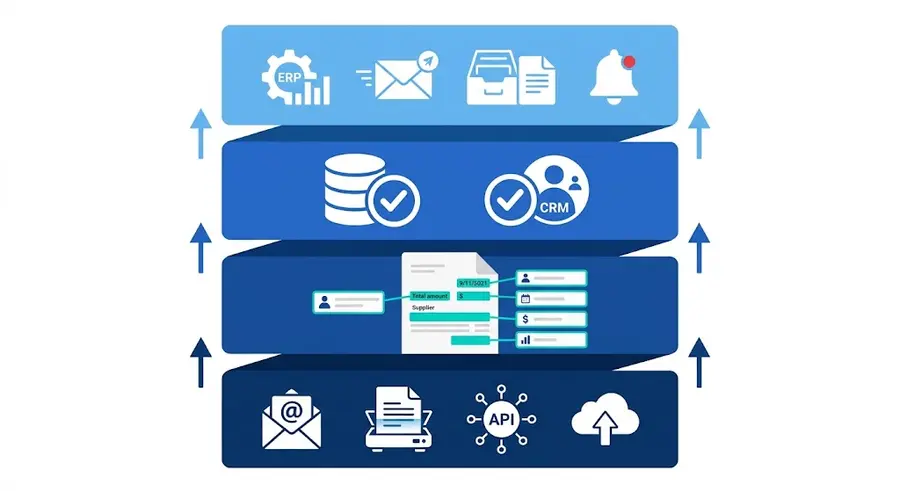
The standard document automation architecture comprises four distinct layers. They nest in the following order and integrate with the existing system without replacing it.
Layer 1: capture. This is the document entry point into the automated system. Every channel is covered: dedicated email inbox per flow type, supplier web upload portal, partner API for connected major accounts, physical scanner in the warehouse or accounting department. Documents arrive from heterogeneous sources and in different formats. The capture layer normalizes them: each incoming document is identified, timestamped, and routed to the next layer with its reception metadata.
Layer 2: extraction. This is where the agent operates. It reads the document, identifies its type (purchase order, invoice, CMR, contract), and extracts the structured fields needed for downstream processing. This extraction is not based on pixel coordinates or predefined templates. It is based on content comprehension: the agent knows that "Amount excl. VAT", "Subtotal before tax", and "Net HT" all refer to the same field across different supplier documents. Each extracted field carries a confidence level. Fields below the confidence threshold are flagged for human validation before proceeding.
Layer 3: validation. The extracted data is automatically verified against the company's internal reference systems. The customer appears in the CRM. The product reference is active in the catalog. The invoiced price matches the negotiated pricing grid for this supplier. The delivery address corresponds to a known site in the reference system. Detected discrepancies are flagged with their nature and criticality level. They do not block the flow: they are presented to the operator with the context needed to decide in 30 seconds.
Layer 4: action. The agent executes the action corresponding to the document type and validation result. It creates the order in the ERP. It posts the supplier invoice. It archives the CMR in the corresponding delivery file. It sends the receipt confirmation to the customer or supplier. It notifies the account manager about a contract requiring review. Zero manual entry on the main flow. Zero delay between document receipt and action in the target system.
These four layers integrate on top of what exists. They do not replace the ERP, CRM, or accounting system. They feed these systems with the data they cannot capture on their own.
Where to Start: The Prioritization Matrix
To automate document processing in a Moroccan industrial company, the flows to prioritize in order are: customer purchase orders, supplier invoices, transport documents. This ranking is based on two combined criteria: monthly flow volume and current processing complexity.
The four-quadrant prioritization matrix provides the decision framework.
First quadrant: high volume, high complexity. These are customer purchase orders and supplier invoices. This is the absolute priority in any document automation project. ROI is fastest because time savings are greatest and eliminated errors have the highest operational value. A project that starts here delivers measurable results in 4 to 6 weeks.
Second quadrant: high volume, low complexity. These are transport documents: CMR notes, delivery notes, bills of lading. They are standardized in structure, their content is predictable, and automating them immediately frees up operational time. Automating this flow directly accelerates customer invoicing. This is the second priority.
Third quadrant: low volume, high complexity. These are contracts and amendments. Partial automation is possible: key clause extraction, deadline detection, revision condition alerts. Human review remains necessary for strategically significant clauses. This is the third priority, deployed after the first two flows are stabilized.
Fourth quadrant: low volume, low complexity. These are routine regulatory documents. Automatable, but without the immediate operational impact of the first three quadrants. They are progressively integrated as the automation scope expands.
The Three Classic Mistakes in a Moroccan Dematerialization Project
These mistakes appear in virtually every project that stalled. Identifying them prevents repeating them.
First mistake: mapping all flows before starting. A comprehensive document flow map of an industrial company takes 6 to 12 weeks depending on organization size. It produces a 40-page document that precisely describes all existing flows. This document solves no problems. It consumes time and energy that could have been invested in an operational pilot. The correct approach is the reverse: identify the most painful flow, the one consuming the most human time or generating the most errors, and deploy a pilot on that single flow in 4 weeks. Measuring real results justifies expansion. The map comes after, not before.
Second mistake: confusing ECM with document automation. The difference between an ECM system and a document automation system is this: ECM archives and organizes documents that have already been processed by humans. Document automation processes documents in place of operators, before they reach the ERP or accounting system. These are two distinct, non-substitutable, non-competing layers. A company that invested in ECM has not solved its document processing problem. It solved its archiving problem. The processing problem remains entirely intact.
Third mistake: ignoring source document quality. A document automation system performs exactly as well as the quality of documents it receives. A 72 DPI scan with text cut off by a poorly framed photocopy produces degraded extraction, regardless of the agent's sophistication. The first step of any serious automation project systematically includes a review of document standards with the relevant suppliers and customers: minimum scan resolution, accepted formats, expected structure for native documents. This upfront work, taking 2 to 3 weeks, multiplies system effectiveness by a factor of 2 to 3 on flows with initially poor document quality.
Typical Results Observed at Six Months
The data below comes from real deployments on industrial document flows. These are observed results, not projections.
On customer purchase orders: 85% reduction in processing time, entry error rate below 0.3% versus 3 to 5% with manual processing, processing capacity multiplied by 4 with no additional hiring. A 2-person ADV team absorbs the volume that required 4 people before deployment.
On supplier invoices: 70% reduction in processing time, supplier payment delays reduced by 40% through elimination of queue waiting time, supplier disputes related to accounting entry errors reduced by 60%.
On transport documents: processing time reduced from 24-48 hours to real-time, customer invoicing accelerated in direct proportion, reduction in carrier disputes related to misfiled or unfound documents.
These results are not uniform. They vary according to source document quality, incoming format diversity, and the complexity of business validation rules. But their order of magnitude is consistent across all observed deployments.
Conclusion
Automating document processing in a Moroccan industrial company is not a digital transformation project. That term carries connotations of complexity, duration, and uncertainty that are not justified by the operational reality of a well-executed deployment.
It is an operational project. It has a defined scope: one document flow, one target system, one set of validation rules. It has a deployment timeline of 4 to 8 weeks on a pilot flow. It produces measurable ROI from the first month of operation, on indicators the company already tracks: processing hours, error rates, payment delays, invoicing delays.
The only prerequisite is identifying the flow that costs your team the most time today. Everything else follows from that identification.
How Mirage works for manufacturers.
See Mirage for manufacturingManufacturing
READY TO AUTOMATE?
Your customers order in their own formats. Your ERP takes one.
PDFs exported from a customer's ERP, Word tables, scanned forms, plain email text: today someone reads each order and keys it in by hand.
More articles like this
Manufacturing Manufacturing
 Manufacturing