

 Manufacturing
Your ADV team's inbox is probably your primary order management system. Not SAP. Not your customer portal. Your Outlook mailbox.
That's where 60 to 70% of real B2B orders arrive in Moroccan industrial companies. A buyer sending an Excel attachment. A customer writing order details in the message body. A key account attaching an official PDF purchase order. A contact replying to a three-day-old thread to confirm a quantity. All these emails land in the same inbox. All of them wait for an ADV operator to open, read, interpret, launch SAP, re-enter the data, and send a manual confirmation.
This flow is neither optimised nor instrumented. It appears in no operational dashboard. It generates no alert when an email has been waiting four hours without being processed. And yet it is the dominant order channel in virtually all Moroccan industrial companies.
This article describes exactly how to automate this flow end to end. From the incoming message to the order created in SAP, in under 2 minutes, with no human intervention on the standard flow.
Anatomy of an Email Order: The Five Real Formats
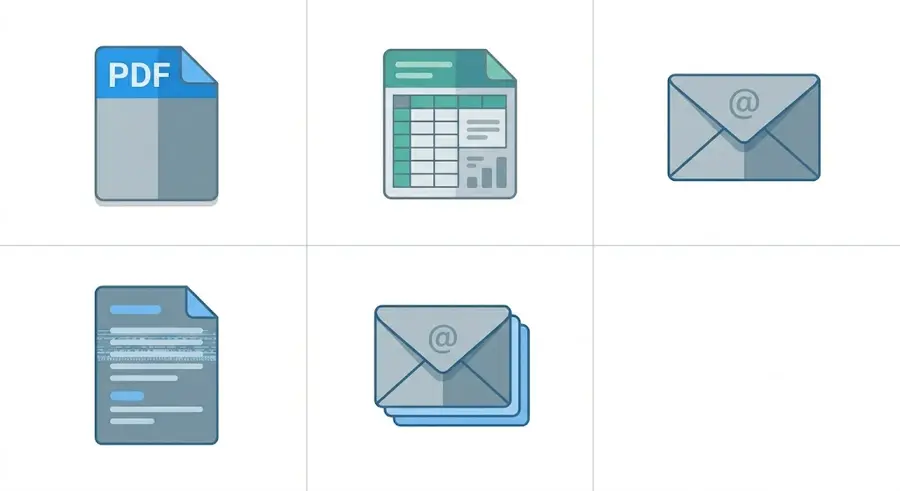
Before designing any automation, you need to map what actually arrives in the ADV inbox. There are five distinct formats, and each poses a different technical challenge.
The first format is the email with a PDF purchase order attached. This is the most structured case. The customer has an ERP or management software that generates a standardised PDF document. The layout is fixed, fields are identifiable, file quality is high. It is the easiest case to process and the least common in the reality of the Moroccan market.
The second format is the email with an Excel spreadsheet attached. The customer manages their orders in a personal Excel file, often different from one order to the next, with renamed columns, total rows mixed in with product rows, and multiple tabs where the right one must be identified. This is a format OCR cannot handle at all, and that standard document AI handles poorly.
The third format is the plain-text email. The message body contains all the information needed to create the order: "Hi, need 30 boxes ref 4402 and 15 pallets ref 7801 for delivery Thursday at the Ain Sebaa warehouse, please confirm." No attachment. No structure. A conversational text that only an LLM agent can interpret correctly.
The fourth format is the email with a scanned image. The purchase order exists on paper, has been signed and stamped, then photographed or scanned and sent as a JPEG or PDF image attachment. Scan quality varies. There may be handwritten annotations in the margins. This is the most difficult format to process and one of the most common in construction and regional distribution sectors.
The fifth format is confirmation within an email thread. The actual order is in a reply to an existing discussion thread, embedded in relational exchanges. "Ok on the quantities, go ahead." Without the thread context, this sentence means nothing. With the context, it is a complete order. Only an agent that reads the entire thread can process it correctly.
A system that does not cover these five formats does not cover the reality of the Moroccan market. It automates a fraction of the flow and leaves the rest as manual processing.
Biodéal: 2,943 orders processed automatically.
See the case studyThe Complete Automated Workflow: Step by Step
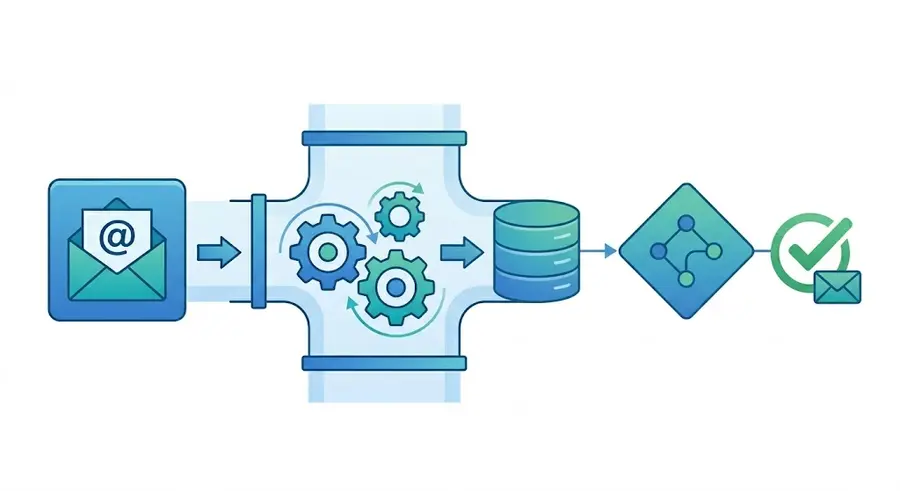
To automate email orders and push them into an ERP, the standard flow includes the following steps.
Step 1: Reception and classification. The email arrives in a dedicated orders inbox, or in the ADV general inbox. The agent reads the incoming email and determines its nature: order, price request, complaint, relational email. This classification is the system's first decision. It is not based on predefined keywords but on content comprehension. An email saying "can you send me a price for 50 units?" is a price request. An email saying "confirmed for 50 units, you can prepare" is an order.
Step 2: Data extraction. Once the email is identified as an order, the agent extracts the fields needed to create the SAP order: customer, product reference, quantity, unit, requested delivery date, delivery address, special conditions mentioned. Extraction adapts to the format: text, PDF, Excel, image, message thread. The source field is traced for every piece of data extracted.
Step 3: Validation against the SAP reference data. Each extracted field is validated against the company's reference data. The customer exists in SAP and is active. The product reference is present in the catalogue and available. The implicit or stated price matches the applicable rate schedule for this customer. The delivery address is linked to the correct customer account. This validation is automatic and takes under 3 seconds.
Step 4: Decision and action. If all fields are validated with sufficient confidence, the order is created directly in SAP. If one or more fields are ambiguous or invalid, the agent isolates those specific fields and generates an internal notification for the ADV operator. The notification contains only the items in question, not the entire order to be re-entered.
Step 5: Customer confirmation. Whether or not there was human intervention, a confirmation is sent automatically to the customer once the order is created: order number, summary of confirmed lines, expected delivery date. The customer receives a reply within 2 minutes of their email, regardless of the time at which they placed their order.
This workflow processes a standard order in 45 seconds to 2 minutes depending on the complexity of the source document. It runs 24 hours a day, 7 days a week, with no end-of-month load spikes.
Mirage engineers deploy the agents inside your systems, next to your team.
Book a callAmbiguous Cases: How the System Decides
This is where simple systems stop and where agents make the difference. Ambiguous cases are not rare. They represent 3 to 7% of the real flow depending on the customer profile. Here are three concrete cases and the expected behaviour of a properly designed system.
First case: the customer orders an obsolete reference. Reference "4402-B" was replaced in the catalogue by reference "4402-C" two months ago. The customer has not updated their internal purchase orders. The agent identifies that "4402-B" no longer exists in the active catalogue. It identifies the designated replacement reference in the system. It generates an exception with both references, the reason for the proposed substitution, and submits the decision to the ADV operator. It does not create the order on a non-existent reference, and it does not reject the order without proposing a solution.
Second case: the order arrives from an unregistered email. A new contact at an existing customer sends an order from their personal email address, not yet registered in SAP. The agent identifies the sender's email domain, links it to the corresponding customer account in the database, creates the order under the correct customer account, notifies the account manager to register the new contact, and confirms receipt to the customer. The order is not blocked because the sender is new.
Third case: the ordered quantity exceeds available stock. The customer orders 200 boxes of a reference with only 140 boxes in stock. The agent does not reject the order and does not create it for 200 boxes with a hidden problem. It creates a firm order for 140 boxes from available stock, automatically generates a back-order for the 60 missing boxes with the expected restocking date, and sends two separate confirmations to the customer: immediate delivery for 140 boxes, deferred delivery for 60 boxes at the restocking date.
All three behaviours share the same logic: the agent neither blocks nor lets an error through. It proposes a resolution or isolates the problem so a human can handle it with full context.
What the ADV Team Actually Gains
The change is not quantitative. It is qualitative in the nature of the work performed.
Before automation, every email order follows the same cycle. The operator opens the email, reads the content, identifies it as an order, opens SAP, re-enters the data field by field, checks consistency, saves, returns to the email, sends a manual confirmation. For a standard order with no complications, this sequence takes 8 to 12 minutes. For an order with an anomaly, a reference to verify, or a customer with special conditions, it takes 20 to 30.
After automation, 93 to 97% of email orders pass into SAP with no human intervention. The ADV operator handles exceptions, averaging 30 seconds per exception, with full context visible. They re-enter nothing. They decide on the cases that warrant a human decision.
The direct operational result is this. A two-person ADV team manages the volume that required four people without automation. Not because the two remaining people work faster, but because 95% of mechanical workload has disappeared. The two remaining people do different work: they manage exceptions, complex customer relationships, and cases that require real human judgment.
Technical Integration: What Is and Is Not Required
The most common technical question in pre-deployment meetings is this: what do we need to touch in our infrastructure?
The answer is straightforward. There is no need to modify SAP. There is no need to deploy new server infrastructure. There is no need to open complex ERP access or launch a 6-month integration project.
Integration with SAP happens via the existing standard API or via a certified connector. The agent has read access to the necessary reference data, product catalogue, customer database, and rate schedules, and write access to the order creation module. This is a narrow, auditable access scope, revocable at any time.
Deployment on a homogeneous email order flow, meaning a set of customers with relatively stable document formats, takes 3 to 4 weeks. The first week is devoted to mapping incoming formats and configuring validation rules. The next two weeks to observation-mode deployment, where the agent processes orders in parallel with the ADV team and results are compared. The fourth week is the go-live switch with supervision.
Data stays within the company's environment. Deployment is possible in private cloud or on-premise depending on the organisation's security requirements.
Conclusion
Your ADV inbox is not a communication channel. It is an unstructured order system that handles 60 to 70% of your incoming flow with no instrumentation, no automatic traceability, and a cost in time and errors that no one in the organisation has ever consolidated because it is invisible in standard reporting.
Automating this flow is the decision with the best impact-to-deployment-time ratio available today for a Moroccan industrial company. The volume processed becomes immediately visible. Time savings are measurable from the first week. Errors disappear structurally, not gradually.
The only prerequisite is deciding that the ADV inbox deserves the same operational attention as the ERP downstream from it.
How Mirage works for manufacturers.
See Mirage for manufacturingManufacturing
READY TO AUTOMATE?
Your customers order in their own formats. Your ERP takes one.
PDFs exported from a customer's ERP, Word tables, scanned forms, plain email text: today someone reads each order and keys it in by hand.
More articles like this
Manufacturing Manufacturing
 Manufacturing