 orderflow
 Building Materials Distributor: Automate Contractor Orders from Any Channel
How building materials distributors automate contractor orders from every channel. One lumber yard went from 200 to 800 orders/day, same team.
++
Building Materials Distributor: Automate Contractor Orders from Any Channel
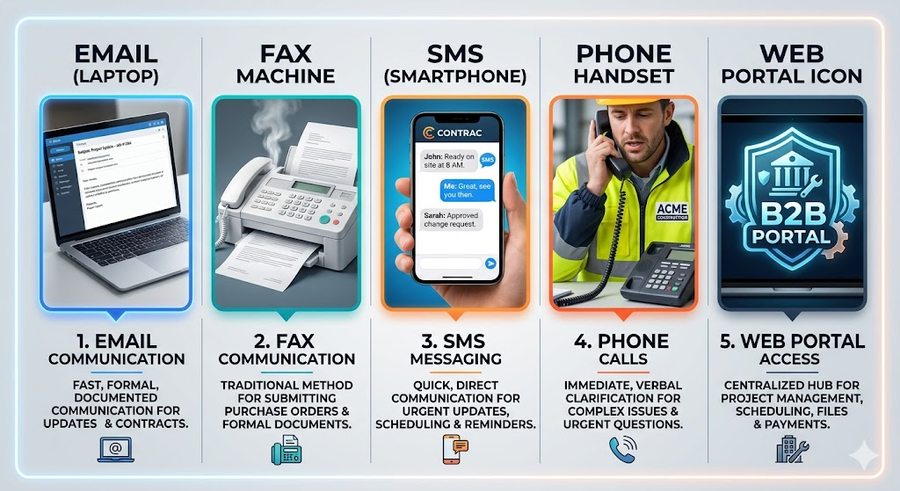
Contractors don't care how they place an order. They'll call, email, fax, text. Whatever is fastest on a job site at 6:47 AM. The result for most building materials distributors is a chaotic mix of order sources that all funnel into the same bottleneck: a CSR manually rekeying everything into the ERP.
At 200 orders a day, you manage. At 500, you hire. At 800, you hire again. Or you automate.
This article breaks down how modern building materials distributors are using AI-powered order automation to handle every channel without adding headcount.
The Multi-Channel Problem No One Talks About
Most distribution software is designed for a single, clean order input. The reality on the ground looks nothing like that.
A typical day for a building materials CSR involves:
Email from a general contractor with a list of 2x4s, OSB, and drywall in a non-standard format
Fax from a roofing sub with a handwritten purchase order
Phone call from a framer who needs a quote before 8 AM
Text message from a regular customer who just sends quantities and expects you to know what they mean
EDI feed from a national contractor that requires perfect formatting
Each of these channels requires a different handling approach, and a different failure mode when something goes wrong.
The average CSR at a mid-size building materials distributor spends 4 to 6 hours per day on order data entry alone. That's time not spent on customer relationships, issue resolution, or upselling.
What Happens When Volume Spikes
Spring and summer hit differently in the building materials world. New construction permits surge, roofing season starts, and renovation projects that were delayed all winter kick off simultaneously.
Order volume can jump 40 to 60 percent in a matter of weeks. CSR teams that were managing at capacity in February are suddenly drowning in April.
The traditional response is overtime and temporary hires, neither of which scales cleanly. Overtime creates burnout. Temporary staff need training time you don't have. Meanwhile, contractors are getting busy signals and slow callbacks, and some of them quietly start calling your competitor.
The underlying issue is that manual order entry doesn't scale. Adding people is a linear solution to what is fundamentally a process problem.
AI-Powered Multi-Channel Order Intake
An AI order automation platform like OrderFlow ingests orders from every channel your customers already use and converts them into clean, ERP-ready entries without human intervention.
Here's how it works across each channel:
Email Orders
The system monitors your orders inbox in real time. When a contractor email arrives (whether it's a formal PO, a bullet list, or a reply to an old thread), the AI extracts the relevant data: customer identity, SKUs or product descriptions, quantities, requested delivery dates, and job site address.
It doesn't require a specific format. It handles the way contractors actually write.
Fax and Scanned Documents
Fax-to-email integrations pass scanned documents to the platform, where computer vision reads handwritten or printed orders and converts them to structured data. Accuracy rates on clean fax documents exceed 97 percent.
Phone Orders
Voice-to-order processing transcribes inbound calls, identifies the customer from their phone number, extracts order details from the conversation, and routes for confirmation. Complex orders with multiple line items and substitutions are handled without manual intervention.
Text and Portal
SMS orders from regular customers are parsed the same way as emails. Web portal submissions go directly to the processing queue with no additional steps.
The Matching Problem: SKUs and Product Descriptions
One of the hardest parts of automating building materials orders is product matching. Contractors don't always use your part numbers. They write "2x6x16 Doug Fir" or "OSB 7/16 sheets" or just "the same roofing felt we got last time."
A trained order automation system handles this through a combination of:
Product catalog fuzzy matching: maps natural language descriptions to your exact SKU
Customer order history: uses past orders to disambiguate common descriptions
Manufacturer cross-reference: maps competitor or generic part numbers to your catalog
When a match is ambiguous, the system flags it for human review rather than guessing. Over time, as the system learns your catalog and your customers' ordering patterns, the exception rate drops significantly.
Real-Time Inventory Verification
Before posting an order to your ERP, an automated system can check real-time inventory availability, including across branches if you operate multiple locations.
This enables three things:
Immediate backorder alerts: the system flags items below threshold and can suggest available substitutes before the order is confirmed
Branch routing: if your main location is out of stock but a nearby branch has the item, the order routes there automatically
Delivery scheduling: availability check results feed directly into delivery window calculation, so the confirmation the contractor receives is accurate
This is a meaningful shift from the current reality, where contractors often only find out about stock issues after the order is "confirmed," which means a callback, a delay, and a frustrated customer.
Pricing Tier Automation
Building materials distributors typically maintain multiple pricing tiers: retail walk-in, contractor accounts, preferred contractors, volume accounts, project-specific pricing. Manually applying the right price to the right customer on every order line is error-prone and time-consuming.
An automated system applies pricing rules at the point of order creation:
Customer account tier is identified at intake
Line-item pricing is applied based on quantity breaks and active promotions
Project-specific pricing agreements are pulled from the ERP and applied automatically
Exceptions trigger a review flag rather than processing at the wrong price
This eliminates a significant source of margin leakage: orders that went through at the wrong tier because a CSR didn't check or didn't know.
Delivery Scheduling Integration
Job site delivery in building materials is complex. Contractors need precise delivery windows because someone has to be on site to receive and unload. A delivery that arrives during a concrete pour or before framing is complete creates real problems.
Automated order intake connects to your delivery scheduling system to:
Present available delivery windows at order confirmation
Optimize truck loading based on delivery routes
Send automated delivery confirmations and day-before reminders to contractors
Flag orders that don't have a confirmed delivery slot before the cut-off time
Case Study: Lumber Yard Scales from 200 to 800 Orders Per Day
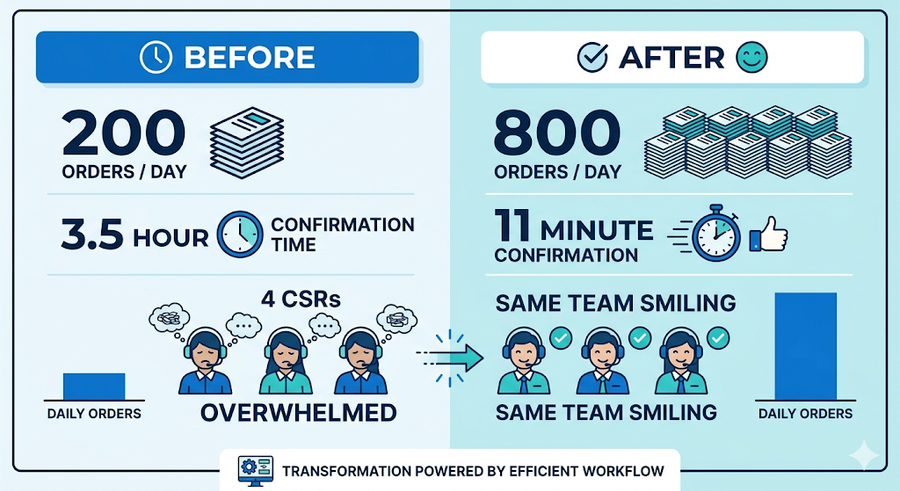
A regional lumber yard in the Southeast was processing approximately 200 orders per day with a CSR team of four. Their primary order channels were phone and email, with a significant volume still coming in via fax from long-standing contractor accounts.
At peak season, response times were slipping. Orders placed in the morning weren't confirmed until afternoon. Contractors were calling to check status, which added to the volume of inbound calls.
After implementing multi-channel order automation:
Order intake capacity reached 800 orders per day (4x the previous throughput) with the same four-person CSR team
Average order confirmation time dropped from 3.5 hours to 11 minutes
Fax order processing, previously the most time-intensive channel, became fully automated with human review only for exception cases
CSRs shifted time from data entry to outbound customer calls, resulting in a measurable increase in upsell and cross-sell conversions
The system paid for itself within the first busy season.
What This Means for Your CSR Team
The concern that comes up in every conversation about order automation is whether it replaces people. The short answer is no. It changes what they do.
Manual data entry is the least valuable thing a skilled CSR does. It's repetitive, error-prone, and provides no customer value. When the system handles intake, CSRs spend their time on:
Handling exception cases that require judgment
Proactive outreach to key accounts
Managing delivery issues and customer escalations
Building the relationships that keep contractors loyal
That's a better job. It's also a more defensible position for your business.
Getting Started
The most common path to implementation starts with a single channel, usually email, since it's typically the highest volume and easiest to monitor. Once the email intake is stable and the team trusts the output, fax and phone channels are added.
A full multi-channel deployment typically goes live within 30 to 45 days, with an exception rate below 5 percent by week six.
If you're processing more than 150 orders per day and your CSR team is spending significant time on data entry, the math on automation almost always works in your favor.
Ready to see what multi-channel order automation looks like for your distribution operation? Book a 30-minute walkthrough with the OrderFlow team.
MANUFACTURING
READY TO AUTOMATE?
Automate your order intake end-to-end
From email to ERP in seconds — no manual entry, no errors.

++
+

