

 Manufacturing
EDI Alternative for Distributors: Connect Small Customers Without IT Headaches
EDI works well for the customers who can afford it. The problem is that most of your customers cannot.
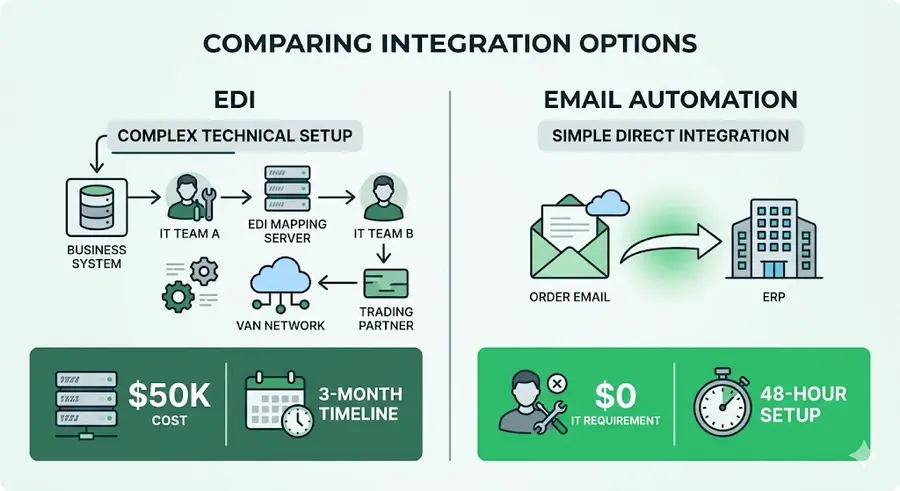
A full EDI implementation costs between $50,000 and $150,000 to set up, requires dedicated IT resources on both sides, and takes three to six months to go live. For a national retail chain or a large manufacturer placing thousands of orders a month, that investment makes sense. For a regional contractor placing fifteen orders a week, it never will.
The result is a two-tier customer base. Large accounts get automated, integrated ordering. Everyone else gets manual handling: emails parsed by hand, faxes rekeyed, phone orders transcribed. That second tier represents the majority of most distributors' customer count, and often a significant portion of their revenue.
This article covers how distributors are closing that gap without EDI.
The EDI Problem No One Talks About Openly
EDI has been the standard for order integration in distribution for decades. It works, and for high-volume trading partners it remains the right solution. But the industry's reliance on EDI as the default integration model has created a structural problem: it has made automated order processing a privilege of scale.
Small and mid-size customers order by email because that is the only option available to them. They do not have IT departments. They do not have integration budgets. They have a purchasing manager who sends a formatted email with a list of part numbers and quantities, and expects a confirmation back the same day.
On the distributor side, that email lands in an inbox and gets processed manually. Someone opens it, creates an order in the ERP, and sends a confirmation. For a distributor receiving 300 emails a day from small accounts, that is 300 manual transactions that could be automated if the connection model were different.
The opportunity is not to force small customers onto EDI. It is to automate the channel they already use.
Biodéal: 2,943 orders processed automatically.
See the case studyEmail as the Integration Layer
The most practical EDI alternative for most distributors is treating email as a structured data channel.
Small customers already send orders by email. The format varies: some use their own PO templates, some send plain-text lists, some forward quotes back with a confirmation. None of this is standardized, and none of it needs to be.
An automated order processing system reads incoming order emails the same way an experienced CSR does. It identifies the customer, parses the line items, matches SKUs, checks inventory, applies pricing, and posts the order to the ERP, all without the email ever being manually opened.
The customer does not change anything about how they order. They send the same email they always sent. The difference is on the distributor side: the order is processed in seconds instead of minutes, and the confirmation goes back automatically.
Zero IT Requirement on the Customer Side
The critical advantage of email-based order automation over EDI is that it requires nothing from the customer.
EDI requires the customer to have a compatible system, an IT team to manage the connection, and a budget to cover setup and maintenance. Email automation requires the customer to have an email address. That bar is met by every business you sell to.
For distributors with hundreds of small accounts, this changes the economics entirely. Instead of automating the twenty percent of customers with EDI capacity and manually handling the other eighty percent, every customer can be on an automated workflow regardless of their technical infrastructure.
Trading Partner Onboarding in 48 Hours
The onboarding process for a new customer on an email automation system is straightforward. The distributor's system is configured with the customer's account details, their typical order patterns, and any customer-specific pricing rules. The customer does not need to do anything except continue ordering the way they always have.
For customers with consistent order formats, the first automated order typically processes cleanly within the first week. For customers with more variable formats, a short learning period of five to ten orders establishes the pattern. After that, exception rates drop below three percent and the account runs automatically.
Contrast that with EDI onboarding, which involves months of technical coordination, format mapping, testing, and troubleshooting before a single live order goes through.
The Customer Portal Option
For customers who want more visibility into their orders, a lightweight self-service portal provides an alternative to email without the complexity of EDI.
The portal requires no installation. Customers log in through a browser, see their account pricing in real time, check inventory availability, and place orders directly. Orders post to the distributor's ERP immediately. The customer receives a confirmation with order details and an estimated ship date.
For customers who place repeat orders from a standard list of products, the portal lets them reorder from their order history in two clicks. For customers who need to upload a BOM or parts list, the portal accepts file uploads and generates a quote or order automatically.
The key difference from a traditional e-commerce approach is that the portal is account-specific. Pricing, product availability, and order logic all reflect the customer's specific relationship with the distributor. It does not look or feel like a generic online store.
Mirage engineers deploy the agents inside your systems, next to your team.
Book a callOrder Acknowledgment and Status Automation
One of the hidden costs of manual order processing for small accounts is the status inquiry. Customers who placed an order by email and did not receive a clear confirmation will call or email to check. That follow-up call takes time on both sides and adds no value.
Automated order acknowledgment eliminates most of that inquiry volume. When an order is received and posted to the ERP, the customer receives a confirmation email with order details, line-item pricing, availability status, and expected ship date. If anything is on backorder, they are told immediately and given the expected date.
When the order ships, an automated notification goes out with tracking information. The customer knows where their order is without calling. The distributor's inside sales team handles fewer status calls and spends more time on proactive account management.
Handling Order Errors and Exceptions
The concern with automating small customer orders is what happens when something goes wrong: an unrecognized part number, a quantity that exceeds available stock, or a pricing discrepancy.
An automated system handles exceptions by flagging them and routing them to the appropriate person rather than failing silently. If a line item cannot be matched to a SKU, the order is partially processed for the matched lines and the exception is flagged for human review. The customer receives a partial acknowledgment with a note that one or more lines require follow-up.
This is actually an improvement over the manual process, where exceptions are often caught late or not at all. A CSR processing forty orders before noon may not notice that a part number has changed or that a pricing tier has been updated. An automated system flags every exception every time.
Case Study: Regional Distributor Automates 200 Small Accounts
A regional industrial distributor had 200 small and mid-size customers ordering exclusively by email. These accounts represented roughly 35 percent of total order volume but required a disproportionate share of CSR time because every order was processed manually.
The distributor had EDI in place for its top fifteen accounts. Extending EDI to the small account base was not financially viable. The IT cost per connection far exceeded the revenue each account generated.
After implementing email-based order automation:
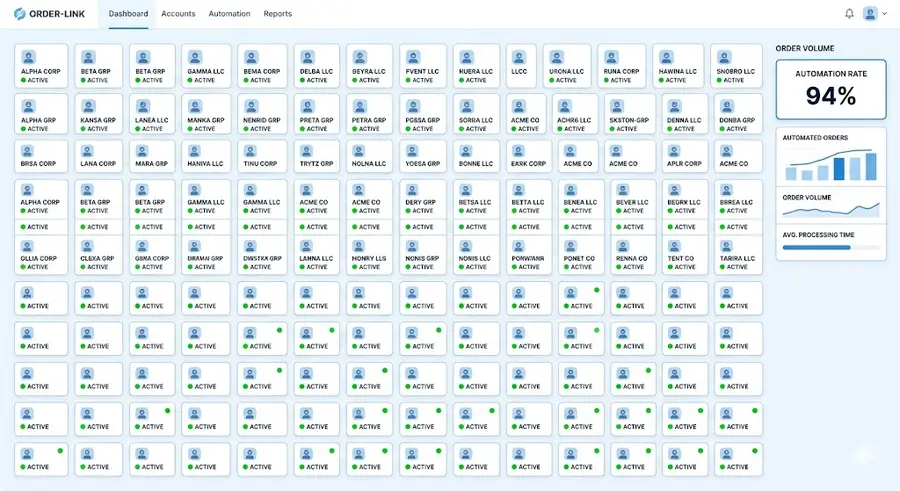
- All 200 small accounts were onboarded within six weeks, averaging 48 hours per account
- 94 percent of incoming email orders from these accounts processed without manual intervention after the first 30 days
- CSR time previously allocated to small account order entry dropped by 78 percent
- Order confirmation time for small accounts fell from an average of 2.5 hours to under 3 minutes
- Status inquiry calls from small accounts dropped by 81 percent following the introduction of automated order acknowledgments
The small account base, previously treated as a high-cost, low-margin segment, became operationally comparable to the EDI-connected national accounts.
The Revenue Case for Automating Small Accounts
Small accounts are often underserved not because they are unprofitable, but because the cost to serve them manually is high relative to their individual order size. When order processing cost drops from eight minutes per order to under thirty seconds, the margin profile of those accounts changes.
Distributors who have automated their small account base consistently report that previously marginal accounts become clearly profitable once the service cost is removed. Some also report an increase in order frequency from small accounts after automation: customers who previously consolidated orders to reduce the friction of placing them start ordering more often because the process is easier.
Getting Started
The starting point is usually a classification of the current customer base by order channel and processing cost. For most distributors, the data shows a clear gap between EDI-connected accounts and manually processed accounts that represents a significant automation opportunity.
From there, implementation starts with the highest-volume email accounts, where the ROI is most immediate. The system is trained on their order formats, and the first live orders go through within days.
There is no customer communication required and no customer action needed. The process change is entirely on the distributor side, which means zero risk of customer disruption during the transition.
Want to see how many of your small accounts could be automated within 30 days? Book a walkthrough with the Mirage team.
How Mirage works for manufacturers.
See Mirage for manufacturingManufacturing
READY TO AUTOMATE?
Your customers order in their own formats. Your ERP takes one.
PDFs exported from a customer's ERP, Word tables, scanned forms, plain email text: today someone reads each order and keys it in by hand.
More articles like this
Manufacturing Manufacturing
 Manufacturing