 orderflow
 How to Automate Order Entry in Your ERP: A Step-by-Step Guide for Distributors
Most distributors think ERP order automation requires an IT project. It does not. Here is the step-by-step framework to go live in under 30 days.
++
How to Automate Order Entry in Your ERP: A Step-by-Step Guide for Distributors
The most common reason distributors give for not automating order entry is not cost. It is complexity. The assumption is that connecting an automation layer to an ERP requires months of IT work, custom development, and a budget that only makes sense for enterprise-scale operations.
That assumption is outdated. Most modern order automation platforms connect to ERP systems through standard API integrations that require no custom development on the ERP side. The implementation timeline for a mid-size distributor is typically 25 to 35 days from kickoff to live orders.
This guide walks through the actual process: what to audit before you start, how the integration works, what to expect at each stage, and where most implementations go wrong.
Why Most Distributors Haven't Done This Yet
Beyond the complexity assumption, there are two other reasons distributors delay order automation.
The first is the belief that their orders are too varied to automate. Customers send orders in dozens of different formats, use their own part numbers, write product descriptions inconsistently, and sometimes place orders in ways that seem impossible to parse without human judgment. This concern is legitimate but overstated. Modern order parsing systems are trained on exactly this kind of variation. The exception rate on a well-implemented system is typically below five percent of line items, which means over 95 percent of orders process without human intervention.
The second reason is sunk cost in the current process. The manual system works, the team knows it, and changing it introduces risk. This is also understandable, but it conflates operational familiarity with operational efficiency. The current system works in the sense that orders eventually get processed. It does not work in the sense that it is the best use of your team's time or the lowest-cost way to handle order volume as it grows.
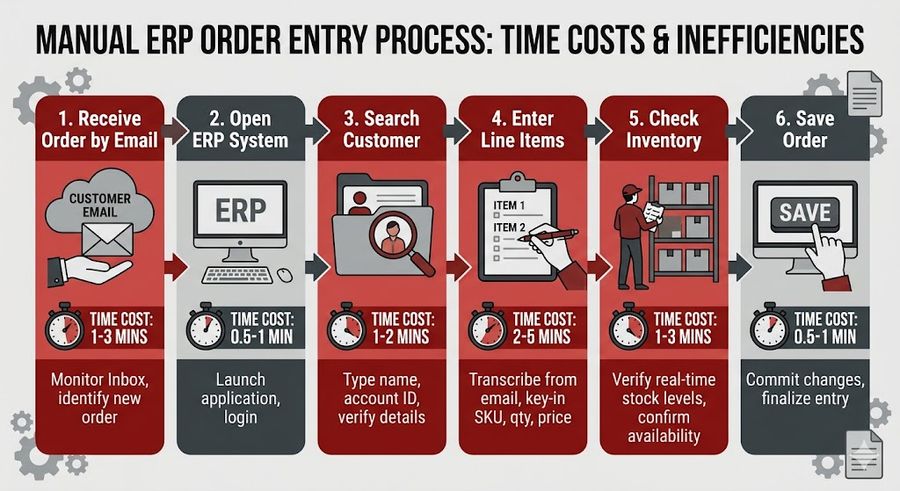
Step 1: Audit Your Current Order Channels and Volume
Before selecting a platform or starting an implementation, you need a clear picture of what you are actually automating. The audit covers four things.
Channel breakdown: What percentage of your incoming orders arrive by email, fax, phone, EDI, and portal? For most distributors, email is the dominant channel at 50 to 70 percent of volume. Fax is often higher than expected among long-standing accounts. Phone orders are the most time-intensive per transaction.
Volume by channel: Total daily order count broken down by channel, and average line items per order. This determines the ROI calculation and helps prioritize which channel to automate first.
Exception mapping: What types of orders consistently require manual intervention? Common exception categories include unrecognized part numbers, pricing disputes, special delivery requirements, and orders that arrive in formats the team cannot parse quickly. Documenting these before implementation helps configure the exception handling logic correctly from the start.
ERP readiness: What ERP system are you running, what version, and does your current instance have API access enabled? Most modern ERP platforms do. Older on-premise installations occasionally require an upgrade or module activation before API connectivity is available.
This audit typically takes two to three days for an operation that has not previously mapped its order flow. The output is a clear picture of volume, channel mix, exception types, and any technical prerequisites.
Step 2: Map Exception Types and Frequency
Exception handling is where most implementations either succeed or struggle. An exception is any order or line item that the automated system cannot process with high confidence and routes to a human for review.
The goal is not zero exceptions. It is a low, stable exception rate with clear handling logic for each type. Well-configured systems reach a steady-state exception rate of two to five percent of line items within 60 to 90 days of go-live. At that level, a team that previously spent five hours per day on order entry spends 20 to 30 minutes reviewing exceptions.
The exception types you map in advance directly shape the system configuration. If you know that 15 percent of your orders from a specific customer segment use internal part numbers that do not match your catalog, you can pre-load a cross-reference table before go-live rather than discovering the gap in week one of live operations.
Common exception types and their pre-configuration solutions:
Unrecognized SKU or part number: Pre-load customer part number cross-references during onboarding. For ongoing exceptions, the system learns from each human correction and updates its matching logic.
Ambiguous product description: Configure fuzzy matching rules for your most common product categories. Prioritize the top 20 percent of SKUs by order frequency, which typically covers 80 percent of line item volume.
Missing required fields: Define which fields are required for automatic posting (customer account, ship-to, at minimum one matched line item) and configure the exception routing for orders missing any of them.
Pricing discrepancy: Set thresholds for automatic pricing application versus human review. Orders where the system-calculated price deviates from the customer's expected price by more than a defined percentage route to a rep rather than posting automatically.
Step 3: Choose Your Integration Approach
There are two main approaches to connecting an order automation platform to your ERP: native connector and middleware layer.
Native ERP connector: The automation platform has a pre-built integration with your specific ERP system. Data flows directly between the two systems through a supported API. This is the preferred approach for the most common ERP platforms in distribution: SAP Business One, NetSuite, Epicor Prophet 21, Epicor Eclipse, Infor CloudSuite Distribution, and Microsoft Dynamics 365.
Native connectors require configuration but not custom development. You define the field mapping, the order posting logic, and the exception routing rules. The connector handles the data translation and API calls. Implementation time for a native connector is typically five to ten business days.
Middleware layer: For less common ERP systems or older on-premise installations without modern API support, a middleware layer sits between the automation platform and the ERP. The middleware handles data transformation and integration with legacy system interfaces. This approach adds complexity and typically adds one to two weeks to implementation, but it extends automation capability to ERP systems that would otherwise require manual re-entry.
For most distributors running a mainstream ERP platform, the native connector approach is the right choice. It is faster to implement, easier to maintain, and provides tighter real-time data synchronization.
Step 4: Pilot on Your Highest-Volume Channel First
Every implementation that tries to automate all channels simultaneously runs into the same problem: when something goes wrong, it is difficult to isolate the source. A phased approach starts with the highest-volume channel, validates the system behavior, and adds channels incrementally.
For most distributors, email is the right starting point. It is typically the highest-volume channel, the formats are most amenable to parsing, and the feedback loop between incoming order and automated output is fast enough to tune the system quickly.
The pilot process:
Week 1 to 2: Catalog ingestion and validation. The automation platform ingests your product catalog, customer account list, and pricing rules. A sample of 200 to 500 historical orders is run through the parsing engine to measure baseline match rates before any live traffic is processed.
Week 3: Shadow mode. Incoming email orders are parsed and processed in parallel with your normal manual process. The automated output is compared to what your team produces manually. Discrepancies are reviewed and used to tune the configuration. No orders are posted to the ERP automatically yet.
Week 4: Controlled live processing. A defined subset of incoming orders, typically from your most consistent customers with the cleanest order formats, begins processing automatically. Exceptions route to the team as usual. The exception rate and match accuracy are monitored daily.
Week 5 and beyond: Full email channel live. Additional channels are added sequentially based on volume and complexity.
What the ERP Integration Actually Looks Like
When an order passes validation in the automation platform, the integration posts it to the ERP as a sales order with all required fields populated: customer account, line items, quantities, pricing, ship-to address, and requested delivery date. The ERP processes the order exactly as if a CSR had entered it manually.
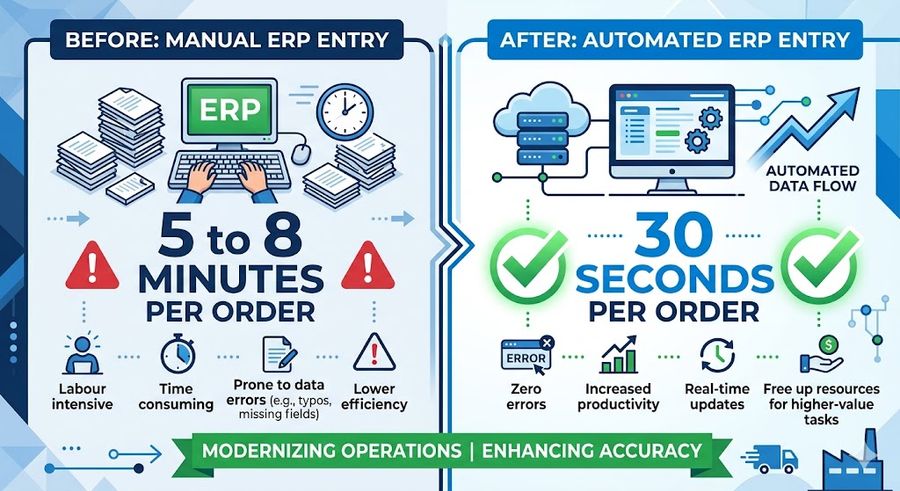
The key difference is that the process happens in seconds, not minutes, and it happens continuously rather than in batches. An order that arrives in your inbox at 5:30 AM can be confirmed and in the pick queue before your team arrives at 8 AM.
Inventory reservation happens at the point of order posting, not when the team gets around to processing the email. For fast-moving items where stock can change between order receipt and processing, this matters.
Order acknowledgments are sent to the customer automatically upon successful ERP posting. The confirmation includes line-item detail, pricing, availability status, and estimated ship date pulled from the ERP in real time.
Common Pitfalls and How to Avoid Them
Going live on all channels simultaneously: The most reliable path is sequential channel rollout. Parallel launch of email, fax, and phone automation creates too many variables to troubleshoot simultaneously.
Skipping catalog validation: The biggest predictor of a high exception rate in week one is a catalog that has not been validated for completeness. Inactive SKUs, missing cross-references, and outdated pricing tables all generate exceptions that could have been resolved before go-live.
No exception review process: Exceptions are valuable data. Each one tells you something about a gap in the configuration. Without a structured process for reviewing and resolving exceptions, the exception rate stays elevated rather than declining toward its steady-state floor.
Setting accuracy expectations too high too early: A 90 percent automatic processing rate in week two is a strong result. Expecting 99 percent in week one sets the team up to question the system when it is actually performing well.
Case Study: HVAC Distributor Live in 28 Days
A regional HVAC distributor processing approximately 180 orders per day decided to automate email order intake after an analysis showed that four CSRs were spending roughly 60 percent of their working hours on order data entry.
Their ERP was Epicor Eclipse, which has a native OrderFlow connector. The implementation followed the phased approach: catalog validation in week one, shadow mode in week two, controlled live in week three, full email channel live by day 28.
At the end of the pilot month:
Automatic processing rate for email orders: 91 percent
Average time from order receipt to ERP posting: 47 seconds
Exception rate: 9 percent in week four, declining to 4.2 percent by week eight
CSR time on order entry: reduced from approximately 22 hours per day across the team to 3.5 hours per day on exception review
Fax and phone channels were added in months two and three respectively. By month four, the team was processing 180 orders per day with one fewer full-time CSR, and the remaining three reps were primarily handling account management and exception resolution.
Getting Started
The starting point for most distributors is the channel audit: how many orders arrive by each channel, what formats are most common, and what the current exception profile looks like. That audit takes two to three days and provides the foundation for an accurate implementation scope and timeline.
From there, a platform evaluation focused on your specific ERP and order channel mix will quickly narrow the options. For most mainstream distribution ERP systems, a native connector exists and implementation can begin within a week of contract signing.
If your operation is processing more than 100 orders per day through manual entry and your team is spending more than two hours per day on data entry tasks, the business case for automation is almost always straightforward. The question is which channel to start with and how fast you want to move.
Ready to map out your implementation? Book a 30-minute session with the OrderFlow team and we will build the project plan together.
MANUFACTURING
READY TO AUTOMATE?
Automate your order intake end-to-end
From email to ERP in seconds — no manual entry, no errors.

++
+

